
The Delete Records dialog removes Kafka records before selected Offsets by advancing the start Offset for each selected Partition. Records with Offsets lower than the selected Delete Before Offset are deleted. The selected Offset itself becomes the first Offset to keep.
Deleting records is permanent. After the operation succeeds, older records are no longer available to consumers or to Offset Explorer.
You can open the dialog from either a Topic or a Partition. When opened from a Topic, the dialog includes all Partitions in that Topic. When opened from a Partition, the dialog includes only that Partition.
The Properties section identifies the target Kafka connection and Topic. These fields are read-only and are shown so you can verify the data source before deleting records.
The Records to Delete section controls how the Delete Before Offset values are chosen.
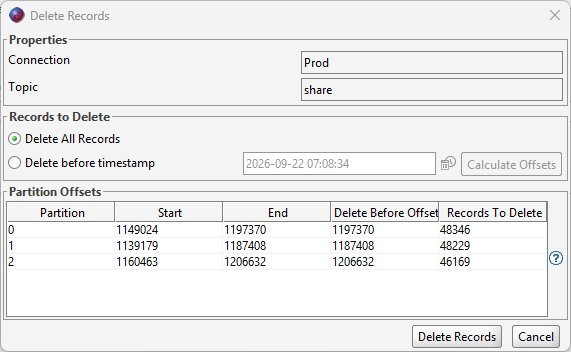
If "Delete before timestamp" is selected, the dialog recalculates the timestamp Offsets again when you click "Delete Records" so the delete request uses current Offset information.
The Partition Offsets table shows the current Offset range and the planned deletion for each Partition.
To choose explicit Offsets, double-click a Delete Before Offset cell, type the new Offset, and press Enter. Values are kept within the Partition's current Start and End Offset range.
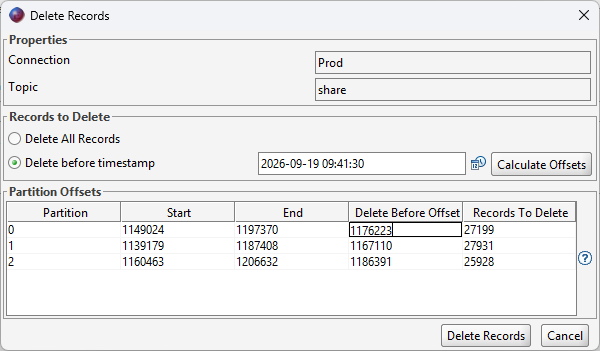
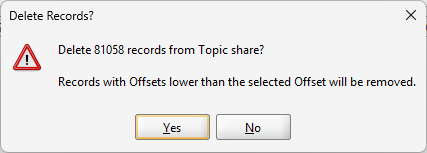
Click "Delete Records" to run the delete operation. Offset Explorer validates the selected Offsets and shows an error if no records are selected for deletion. Before sending the request to Kafka, it shows a confirmation message with the total number of records that will be deleted from the Topic.
After the delete completes, the results dialog lists each changed Partition with its old start Offset, records deleted, and new start Offset. The Topic or Partition view is refreshed after the dialog closes.
Records can also be deleted with the deleteRecords command-line option.
See the deleteRecords command-line documentation for syntax and examples.