
Local Schemas let you keep Avro, Protobuf, and JSON Schema definitions inside Offset Explorer without adding them to an external Schema Registry. They are useful for development clusters, offline work, sample data, historical formats, and topics whose schemas are known but are not stored in Schema Registry.
A Local Schema is organized as a local Subject. Each Subject has a name, a schema type, and one or more schema versions. Local Schemas are stored on the workstation running Offset Explorer. They are not published to Kafka, Schema Registry, or any server connection.
The object browser contains a Local Schemas node. Select it to see the saved local Subjects. The list shows each Subject name, type, and latest version. You can filter the list, refresh it, print it, add new Subjects, and delete existing Subjects from this view.
Selecting a local Subject opens its detail panel. The Properties tab shows the Subject name, schema type, and creation timestamp. The Schema tab shows the selected schema version and its definition.
Click the Add button in the Local Schemas list to create a local Subject. In the Add Local Subject dialog, enter the Subject name, choose the schema type, and paste the schema definition into the editor.
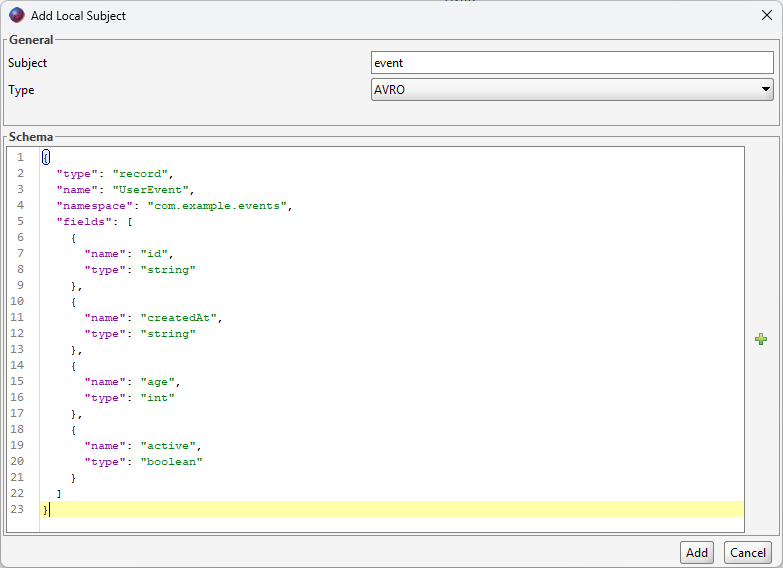
Offset Explorer supports these local schema types:
The Subject name must be unique among Local Schemas. The schema text is validated before the Subject is saved. If the schema cannot be parsed, Offset Explorer displays the parser error and does not create the Subject.
The first saved schema becomes version 1 of the local Subject.
Open a local Subject and select the Schema tab to review and edit schema versions. The version drop-down loads a specific version and shows its timestamp. The schema editor applies the same syntax coloring and editor settings used by Schema Registry schemas.
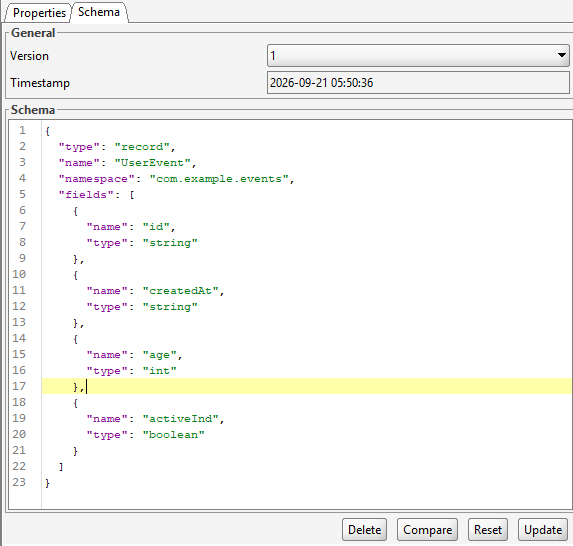
To create a new version, edit the schema text and click Update. Offset Explorer validates the schema and saves it as the next version number. The existing versions are kept.
The Reset button restores the editor to the loaded version. The Compare button compares the selected version with another version, or compares the selected version with your unsaved editor changes.
You can delete a selected version with the Delete button. If the deleted version is the last version of a Subject, the Subject is removed as well.
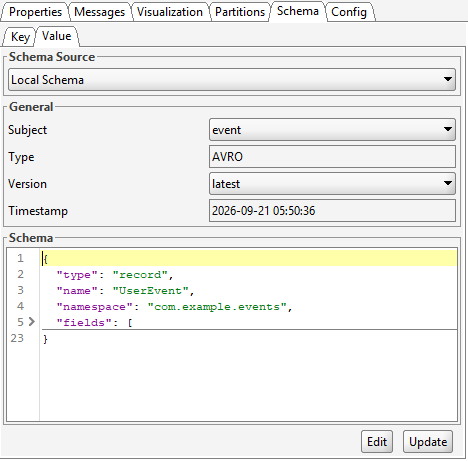
Local Schemas are used from a Topic's Schema tab. The tab has separate pages for the Topic key and value. In the Schema Source section, choose one of these sources:
| Source | Description |
|---|---|
| None | No schema is associated with the selected key or value side. |
| Schema Registry | Uses the configured Schema Registry and the conventional Subject name for the Topic key or value. |
| Local Schema | Uses a local Subject stored in Offset Explorer. |
When you choose Local Schema, select the local Subject and version. You can bind the Topic to a specific version, or select latest so the binding follows the newest version of that local Subject.
Click Update to save the key or value binding. The binding is stored with the server connection settings, so it is restored when you reopen the Topic. The Edit button opens the selected local Subject and version from the Local Schemas section.
Also open the Topic's Properties tab and set the key or value Content Type to the corresponding schema format: Avro, Protobuf, or JSON Schema. The schema binding identifies which schema to use, while the Content Type tells Offset Explorer how to decode the Topic data.

A local Subject or schema version cannot be deleted while it is used by a Topic binding. Offset Explorer checks all saved server connections before deleting. If a Topic is using the Subject or version, the delete action is blocked and the message identifies the Topic and server connection.
If a Topic binding uses latest, every version of that local Subject is considered in use because deleting any version can change what "latest" means. Change or remove the Topic binding before deleting the local Subject or its versions.
Local Schemas are saved as XML files in the user's Offset Explorer settings directory:
${user.home}/.offsetexplorer4/schemas
On Windows, this is typically:
C:\Users\your-user-name\.offsetexplorer4\schemas
Each local Subject is stored as one .xml file. The file contains the Subject name, schema type,
all saved schema versions, timestamps, and the schema definitions. The Subject name is encoded in the file
name so Subjects with spaces or special characters can still be saved safely.
To send local schema definitions to another person, copy the relevant .xml files from this
directory. The recipient can place the files in their own .offsetexplorer4/schemas directory
and restart Offset Explorer, or reload the application, so the Local Schemas list is rebuilt from those files.
Topic bindings are stored separately with server connection settings. Copying local Subject files shares the schema definitions and versions, but it does not automatically copy another user's Topic-to-schema bindings.
Local Schemas do not replace Schema Registry for production compatibility management. They do not register schema IDs, enforce registry compatibility settings, or publish schemas for other applications.
Use Schema Registry when your Kafka clients rely on Confluent wire-format schema IDs or when multiple users and applications need a shared schema source. Use Local Schemas when you need a private, editor-managed schema catalog inside Offset Explorer.